





This article was brought to you by InfraSketch.
Tl;dr
Software architecture tools fall into three categories: traditional diagramming tools, diagrams-as-code, and AI-powered tools.
Diagrams-as-code tools are great for version control but require learning syntax.
AI-powered tools like InfraSketch generate diagrams from natural language and iterate through conversation, eliminating both manual drawing and syntax memorization.
Let's kick off
Diagramming software architecture is essential for communicating complexity. Clear system designs help engineering teams understand the architecture, plan future development, and identify potential issues before they become problems.
Traditionally, you had two options:
- Manual diagramming (Lucidchart, Draw.io): Drag shapes, draw connections, spend hours on layout
- Diagrams as code (Mermaid, PlantUML): Write markup, learn syntax, check into source control
But there's a new category emerging: AI-powered diagram generation. Instead of drawing or coding, you describe your system in plain English and get a professional architecture diagram in seconds.
Let's compare the 7 best tools across all categories.
1. InfraSketch
InfraSketch is an AI agent that generates architecture diagrams from natural language descriptions and refines them through conversation.
Free tier available with Starter at $1/month and Pro at $4.99/month.
Best for architects and engineers who want to rapidly prototype systems, prepare for design interviews, or create architecture proposals without learning any syntax.
It includes features such as:
- Natural language generation: Describe what you want to build, get a diagram in seconds
- Conversational refinement: Click any component, chat to modify, watch the diagram update in real-time
- Auto-generated design docs: One-click comprehensive technical documentation (PDF, Markdown, PNG)
- Claude AI integration: Speed and Power models for intelligent system understanding
- No syntax to learn: Just describe your system like you would to a colleague
- Collapsible groups: Organize complex diagrams with expandable component clusters
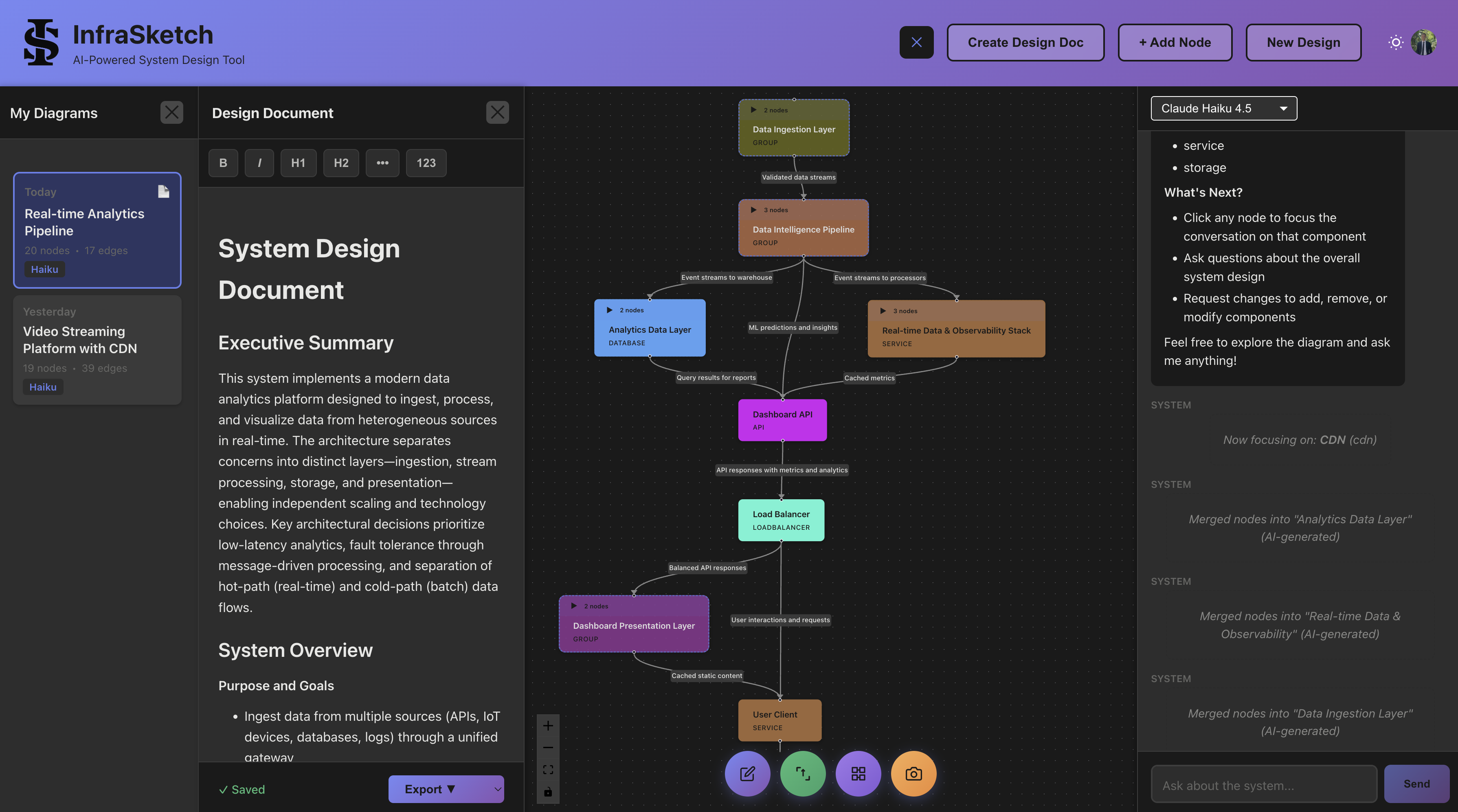
How it works:
- Describe: "Build a video streaming platform with CDN, transcoding, and recommendations"
- Generate: AI creates complete architecture diagram with 4-8 core components
- Iterate: Click any node to ask questions or request changes
- Export: Generate design doc with one click
2. Mermaid
Mermaid is a JavaScript-based diagramming tool that uses simple text syntax to create diagrams.
Free and open source (MIT license).
Best for developers who want diagrams that render directly in GitHub README files and work with existing markdown workflows.
It includes features such as:
- Native preview on GitHub (no external tools needed)
- Flowchart, sequence, class, state, and ER diagrams
- Mindmaps, Gantt charts, and pie charts
- Huge community and ecosystem
- Integrates with VS Code, Notion, and most documentation tools

3. Structurizr
Structurizr builds upon "diagrams as code", allowing you to create multiple diagrams from a single model using the C4 model methodology.
Free and open source (Apache 2.0) with a paid web platform.
Best for enterprise teams and architects who follow the C4 model and want to generate consistent diagrams at multiple levels of abstraction.
It includes features such as:
- Designed specifically for the C4 model (Context, Container, Component, Code)
- DSL creates multiple diagram views from a single model
- Architectural Decision Records (ADRs) support
- Check into source control for version history
- Multiple export formats

4. D2 (Terrastruct)
D2 from Terrastruct is a modern diagram scripting language that turns text into diagrams with sophisticated auto-layout.
Free and open source (MPL 2.0) with a paid web platform.
Best for developers who want flexible, beautiful diagrams with automatic layout that doesn't require manual positioning.
It includes features such as:
- TALA automatic layout engine (superior positioning)
- Sketch-drawn diagram mode for informal visuals
- SQL tables, classes, and sequence diagrams
- Interactive tooltips and links
- Multiple themes and styling options

5. PlantUML
PlantUML is a venerable tool that supports the widest variety of diagram types using text-based notation.
Free and open source (GPL 3.0).
Best for teams that need many different diagram types (sequence, component, deployment, use-case, class) in a single tool with a massive ecosystem of plugins.
It includes features such as:
- Sequence, use-case, class, object, and activity diagrams
- Component and deployment diagrams
- C4 model plugin available
- Large ecosystem of IDE integrations
- PDF and image export

6. Eraser.io
Eraser is an AI-enhanced documentation tool that includes diagram generation with manual refinement capabilities.
Free tier with paid plans for teams.
Best for teams wanting AI assistance while maintaining manual control over the final output, especially for technical documentation.
It includes features such as:
- DiagramGPT generates diagrams from text descriptions
- Canvas-based manual editing and refinement
- Real-time team collaboration
- Cloud-based storage and version history
- Clean, minimalist interface

7. Diagrams (Python)
Diagrams lets you draw cloud system architectures using Python code.
Free and open source (MIT license).
Best for Python developers and platform engineers who want to programmatically generate infrastructure diagrams with cloud provider icons.
It includes features such as:
- AWS, Azure, GCP, OpenStack, K8s, and DigitalOcean icons built-in
- Automatic layout engine
- Generic technology and programming icons
- Custom icon support
- Version control friendly (it's just Python)
Comparison Table
| Tool | AI-Powered | Auto-Layout | Version Control | Design Docs | Pricing |
|---|---|---|---|---|---|
| InfraSketch | Full Agent | Yes | Session History | Auto-Generated | Free / $1/mo |
| Mermaid | No | Yes | Git-native | No | Free (OSS) |
| Structurizr | No | Yes | Git-native | ADRs | Free / Paid |
| D2 | No | TALA | Git-native | No | Free / Paid |
| PlantUML | No | Yes | Git-native | No | Free (OSS) |
| Eraser.io | Assisted | Yes | Cloud | Templates | Freemium |
| Diagrams | No | Yes | Git-native | No | Free (OSS) |
When to Use What
Speed matters most: InfraSketch generates diagrams in seconds from English descriptions
GitHub-native docs: Mermaid renders directly in README files without any external tools
C4 model practitioners: Structurizr is purpose-built for C4 with multiple abstraction levels
Beautiful auto-layout: D2 with TALA engine produces elegant, well-positioned diagrams
Maximum diagram types: PlantUML supports more diagram types than any other tool
Team collaboration: Eraser.io or Structurizr's web platform for real-time editing
Infrastructure diagrams: Diagrams (Python) has all the cloud provider icons you need
The AI Advantage
Traditional diagramming has a fundamental problem: the blank canvas.
You sit down to document your architecture, stare at an empty screen, and wonder where to start. Do you begin with the database? The API layer? The message queue? Even experienced architects face this paralysis.
AI-powered tools like InfraSketch flip this on its head. Instead of building up from nothing, you describe what you're building: "Design an e-commerce platform with user service, inventory, payments, and order processing."
Within seconds, you have a starting point. Not a perfect diagram, but a conversation starter. Click on the payment service: "Should this use Stripe or handle payments directly?" The AI responds with recommendations, and you refine.
This conversational approach matches how architects actually think. We don't design in isolation; we iterate through discussion. AI tools bring that natural workflow to diagramming.
To Wrap Up
There are many architecture diagram tools to choose from. The best fit depends on your workflow:
- Need speed? AI-powered tools like InfraSketch eliminate the blank canvas problem
- Need version control? Diagrams-as-code tools integrate with Git
- Need collaboration? Web-based platforms enable real-time editing
- Need documentation? InfraSketch generates comprehensive design docs automatically
Key considerations when choosing:
- Learning curve: Do you want to learn a syntax, or just describe what you need?
- Version control: Does your team need Git-based history?
- Output quality: How polished do diagrams need to be?
- Documentation: Do you need design docs alongside diagrams?
Try InfraSketch free to experience AI-powered architecture diagramming firsthand. Describe your system, iterate through conversation, and export a complete design document, all in minutes instead of hours.